Posts

Showing posts from August, 2020

The Best Free Radio DJ Software? (RadioDJ)

Image
Recently saw someone search for The Best Free Radio DJ Software when I looked at the stats on Google Analytics. By now they'll hopefully be using the best free music automation program of them all. RadioDJ is the best radio playout software IMHO Built around the .NET framework (at least 3.5 & 4.6.1) and a MySQL database its pretty reliable and stable. Q: Is RadioDJ really free? A: Yes its 100% free for use by any DJ or radio station, anywhere in the world. Despite claims by other software developers RadioDJ is a great starting point to start your own Internet radio station. RadioDJ doesn't rely on massive amounts of CPU it can run on a system with as little as 1GB RAM and least 1000 MHz CPU. Your system should have more power and processing, You can pick up computers with decent specifications cheaply these days. A new user of the software recently said this about RadioDJ. I'm new to RadioDJ it is bett...
Setting Up An Encoder (Streaming Media)

Image
A user on the RadioDJ forums was asking for help setting up his encoder. Most encoding software tends to be similar to setup and run. Whether that be a stand alone encoder or a built in one. Its not difficult setting up an encoder. Most of the encoding programs rely on several bits of information in order for you to connect to Shoutcast or Icecast. Server or IP address : Tends to be the address your streaming provider emailed you it will look something like this. e.g: 184.154.145.114 or fred.myshoutcastprovider.com (Without the http:// part) Server Port : This will be the port number you or your provider set for you when you setup or signed up for the server. e.g: 8015 Server Type : You have different options when it comes to streaming this will usually be Shoutcast, Shoutcast v2 or Icecastv2 If you need to stream to another service such as Live365 You may want to ask their support team to help you with any connection issues Encoder Password : This will be...

Sound Empire Caster Stable

Image
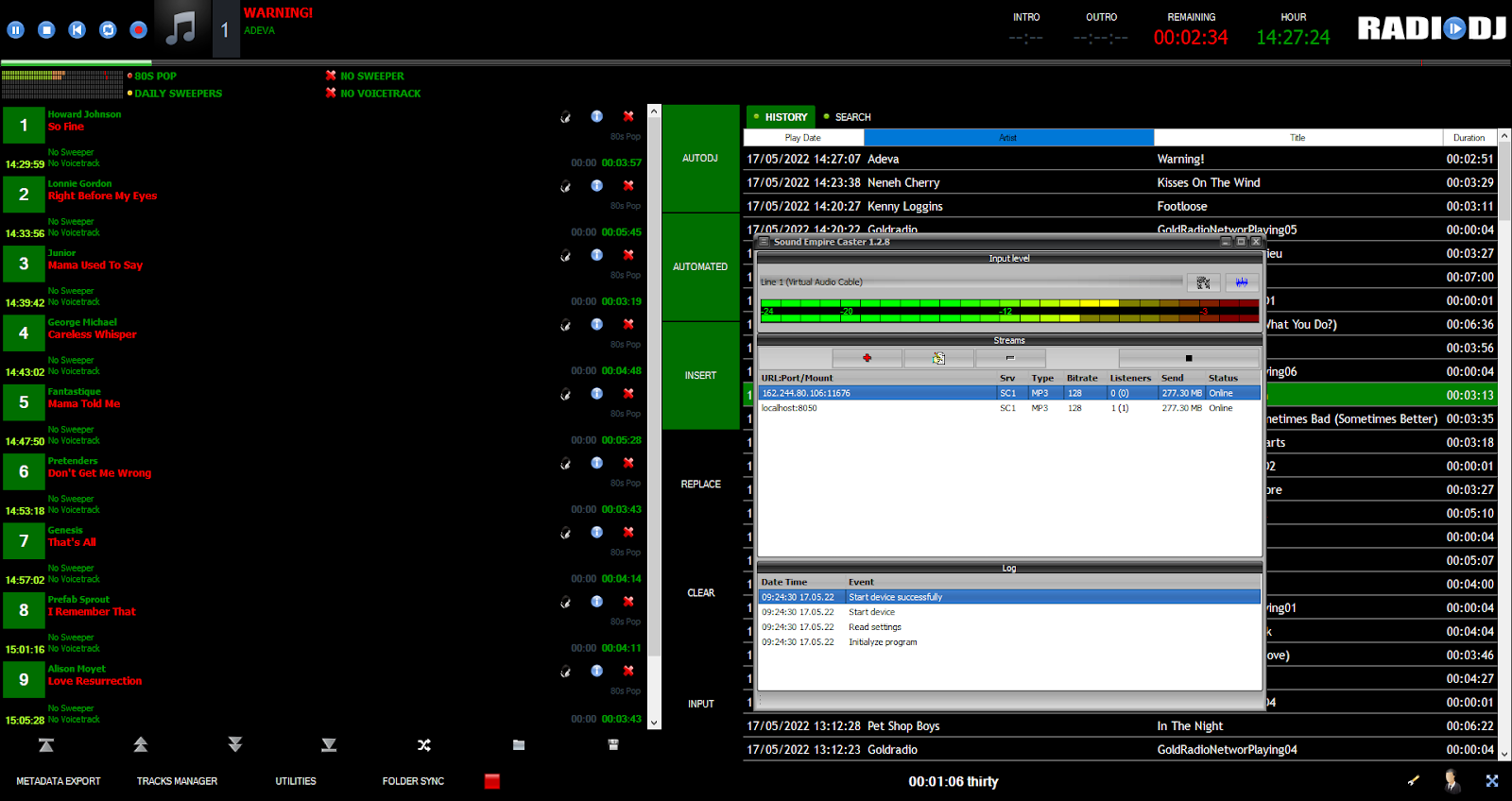
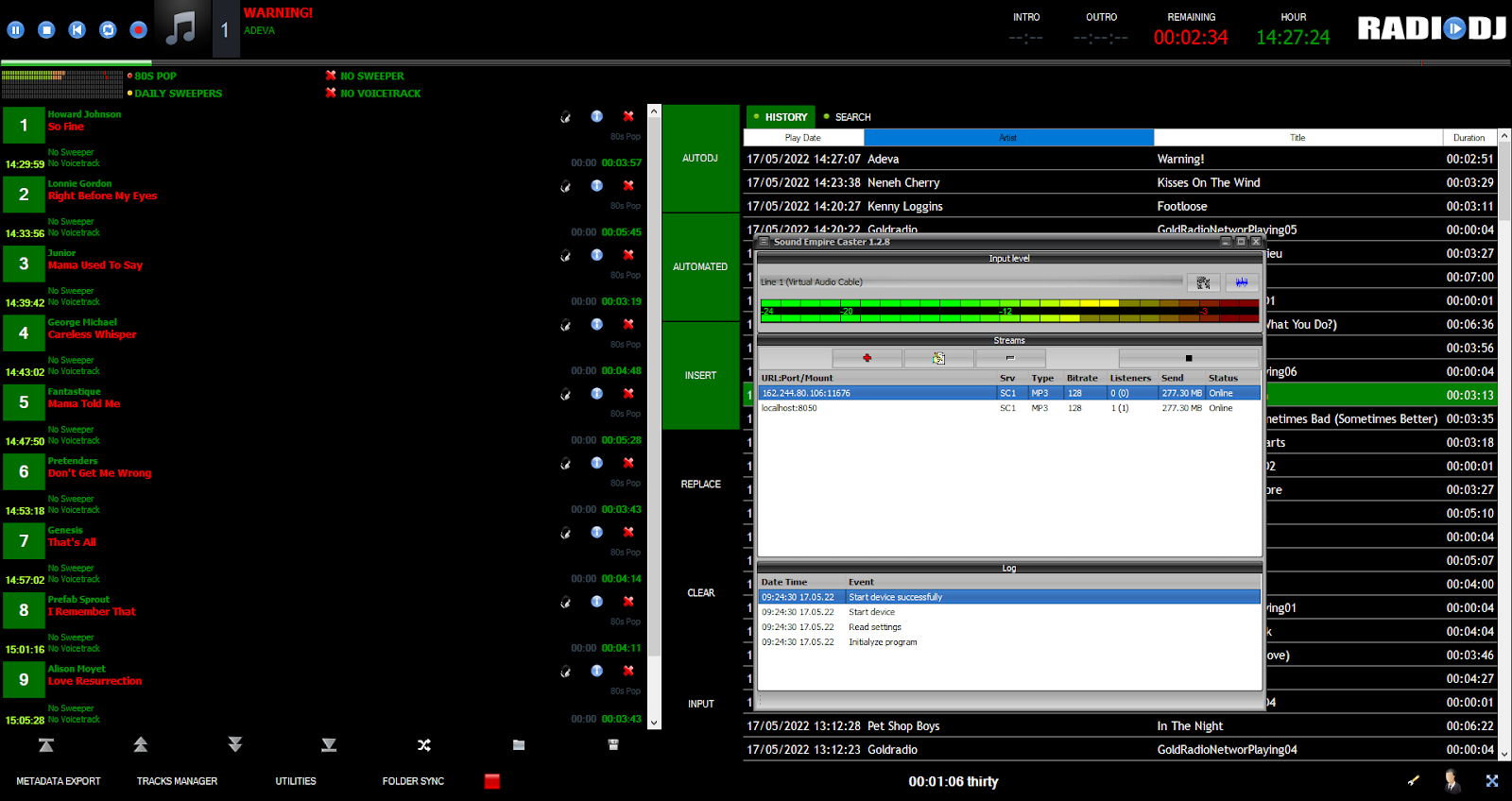
I've tested lots of encoding software in all the years I've been into Internetradio. Oddcast, Edcast, Altacast, MB Recaster, BUTT, SAM Cast (Simplecast) & Various Winamp DSP Encoders. Most encoding software has been OK but a couple of the programs I tried to stream with caused buffering on my stream(s) The Shoutcast DSP plugin for Winamp was one of the worst encoders I tried my stream would often cut out and buffer The SAM DSP/Simplecast encoders would also buffer and cut out. SAM Cast can't handle title streaming so if you use that your listeners wouldn't know what you were playing on your stream. The encoding software DSP solutions I was trying and testing 18 years ago weren't much KOP. Fast forward 18 years and I think I've found the most stable piece of encoding software ever Sound Empire Caster I've been testing it for quite some time now and I haven't had to deal with any buf...

Running A MySQL Database Along Side RadioDJ Needn't Be Scary!

Image
So you think its going to be scary installing a MySQL database alongside RadioDJ ( Hint: It isn't difficult) What are you scared of? Running a MySQL database server need not be scary and it needn't be a hassle. With MariaDB its easy to Install It should also install a tool called HeidiSQL which is where you do your basic maintenance on your MySQL server. The last time I rebuilt my RadioDJ song database from scratch was June 2014. I take daily backups of the database so I don't lose all my hard work or changes to my song database! How To Install MariaDB TIP: If you've previously tried to install MySQL server you will need to follow This Post about removing the service first. If you followed the simple tutorial you should have MariaDB setup and running within 5/10 minutes. Right click on the taskbar and select task manager & look for the service mysqld.exe or MariaDB in task manager. Once you have MariaDB working I'm going to su...

Have You Made The Switch Yet?

Image
It's always nice seeing other people switching from SAM Broadcaster Pro to RadioDJ radio playout software. Someone said this recently on Social media: I switched from SAM Broadcaster and have not looked back. I was hesitant at first but RadioDJ has made my station so much more streamlined If you haven't discovered RadioDJ yet what are you waiting for? RadioDJ works better than SAM Broadcaster Pro and shouldn't crash or go wrong. We know of users of RadioDJ who haven't restarted RadioDJ in 4 years Radio DJ is an extremely stable & reliable automation program. Users have had this to say about Radio DJ: We recently made the switch from SAM Broadcaster to RadioDJ with no regrets at all We've had no downtime or crashes since we switched My RadioDJ system is sounding so good! What a fantastic piece of software The thing I like about RadioDJ is the stability Listening trend is up since migrating to RadioDJ! RadioDJ is the best playout sy...

RadioDJ Crossfade Settings

Image
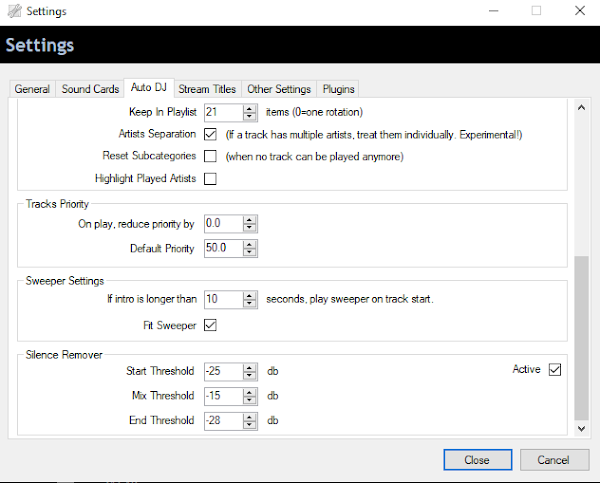
With music automation software you would expect a smooth crossfade/transition between songs wouldn't you? This is another area where RadioDJ seems to EXCEL The transition between songs is amazing even with songs that have sudden endings Everything I've thrown at RadioDJ has played and crossfaded as it should. I currently use these settings for crossfading in RadioDJ Mixer buffer is on the first screen on the options menu. Mixer Buffer = 3 The Mixing thresholds are under the AutoDJ tab. Start Threshold = -25 db Mix Threshold = -15 db End Threshold = -28 db My fadeout duration has been set at 3900ms for a few years now and always fades tracks rather well. It's rare you have silence between tracks with RadioDJ Reasons to Use RadioDJ: Once installed it's stable and works for days/weeks without needing to keep an eye on it Great Music library support add as many categ...

RadioDJ And Its Magic Crossfade

Image
I'm sat here surfing the web & RadioDJ is playing away in the background doing amazing crossfades between songs and jingles. The crossfading in RadioDJ is just another reason to LOVE the software I'm happy I've found the most perfect piece of audio playback software. If only technology had been this advanced in the 1980s I wouldn't have a bad back from carrying boxes of Vinyl Most of the DJ automation software I tried out back in 1999/2000 was a nightmare to work with in all honesty Some of the DJ software offerings 20+ years ago were so bad they would would crash if you tried adding a large library of songs. I tried Winamp 2.9 and it was OK as a media player but wasn't ideal for doing DJ work with, Winamp struggled to crossfade smoothly between tracks even with the use of DSP Crossfading plugins. Then I discovered a program called MusicMatch Jukebox which at the time was the best audio player available. It had a reasona...

Encoding Software (Standalone Encoders)

Image
To get your stream online its easier if you use a standalone encoding solution Its not difficult to use a stand alone encoder. You configure it the same as a built in one. The MYTH that a standalone encoder is harder to use is put out by software developers who include built in encoders in their software A Standalone encoder picks up the audio from Stereo Mix or Virtual Audio Cable. I've yet to see built in encoders function properly in some software, I frequently encountered lots of buffering messages. Using stand alone encoding means RadioDJ can be left to do what its does best AUTOMATING your songs and jingles. I've used the standalone encoding method since I discovered RadioDJ in 2010 Standalone Encoders are more reliable I've NOT had an issue with Stand Alone encoding software while streaming. Here are just some of the free Internet radio streaming encoders available. 1) Sound Empire Caster ($0.00) ...

Stability? RadioDJ Has That In Spades

Image
I've been into Internet radio for a long time now (Over 20 Years) In all those years I've learnt a lot of things about streaming on the Internet. It's been a fun thing to learn about although at times it's been hard work because software wasn't up to the job. The biggest problem I've encountered when it came to Internet radio automation offerings was always been the lack of Reliability & Stability I couldn't get a stream to hold up for longer than a few hours let alone days with certain software. I don't appear to have that problem with RadioDJ FREE radio automation software. I began using RadioDJ v1.3.7.0 back in 2010 and that worked great running the music for the radio stream I had going. A few months later v1.6.0 came out and that was even better and served me well until we started testing the 1.6.x.x Beta versions. Even in Beta RadioDJ performed better than other well known radio playout software. The newer vers...

Large Playlist Freezes RadioDJ?

Image
Someone tweeted me recently to say they were going to try RadioDJ free radio play out software. Later on I received this Post: @DJGaryBaldy After spending time with RadioDJ it isn't looking good It Can't seem to handle loading a large playlist without freezing Marius the author of the software stated this before on the forums about playlists: I don't recommend you to load a single large playlist Otherwise it will slow the program down The user went on to mention the number 25,000 in a later Tweet regarding loading the playlist into Winamp. Our key library is a randomized playlist of over 25,000 tracks If that's the size playlist he was trying to load into RadioDJ then there's no wonder RadioDJ froze. Its down to the processing power of your PC & the amount of connections MySQL can handle It's NOT a limitation of RadioDJ! We'd imagine other radio automation software would lock up, crash and freeze if you tried loading a 25,000 tra...

RadioDJ & AAC+ Streams

Image
A user on the forums was having issues getting an AAC+ Internet stream to play in RadioDJ. RadioDJ doesn't natively come bundled with the Bass AAC codec as it would cost Marius a lot of money to include that codec in his software. HOWEVER: You can play AAC+ streams in RadioDJ if you download the BASS AAC codec yourself from http://un4seen.com/ Unzip the folder. Close RadioDJ & place the bass_aac.dll file inside the bass_plugins folder inside the RadioDJ folder. Restart RadioDJ and you should now be able to playback AAC+ streams. That is literally ALL there is to it.

How To: Enable History In RadioDJ

Image
This is another search term that came through from a user visiting my old website.  Q: How do you enable history in RadioDJ? A: You need to go to Options>Options>Stream Titles. You just need to change the number from 0 to however many days you want your history to be saved for, We have it at 365 days. Please Note: You cannot currently set it at more than 365 days

I Wish There Was An Alternative To Sam Broadcaster

Image
Recently saw someone post this statement on Social Media: I genuinely wish there was an alternative to SAM Broadcaster on the market They can't have searched otherwise they would know there is a 100% FREE alternative that works better than SAM Broadcaster I cannot stress enough just how Amazing, Reliable and Stable RadioDJ Free Radio Automation is. I've thrown everything at RadioDJ since 2010 and it's worked everytime I've gone to play music. Even the BETA versions 1.6.x.x performed as they should with very few issues. RadioDJ loads rotations/events/playlists and It works for days/weeks without needing to keep an eye on it. I just wish SAM Broadcaster Pro in all it's various guises had been this reliable but alas it never was. SAM would crash/freeze when you least expected it or wanted it to. Radio DJ has NEVER let ME down since I started using the software way back in 2010. I've been able to do live shows and record stuff without...

Anxious It makes me Anxious

Image
As the title would suggest I am a sufferer of really bad Anxiety & stops me from doing things in life. My Anxiety got the better of me at Junior school after the loss of my mother when I was 7. I'd finish my work ahead of everyone else and the more the teachers ignored me the more Anxious I would get. Which would then culminate in a Panic attack (Which people always put down as me being Disruptive) I wasn't being disruptive or violent it was my Anxiety rearing its ugly head. I was shipped out to a Special School in the end for emotional difficulties. Even when I started out as DJ in 1987 my Anxiety was still bad. Someone arranged for me to DJ at a party before the gig I got stage fright I later ended up curled up in a ball on my bed. On another occasion I was called over to the DJ booth in a nightclub and they wanted me to spin a few tunes, second I got behind the decks my mouth went dry and ...

Importing Shoutcast Icecast Streams In RadioDJ

Image
How do you import a Shoutcast or Icecast stream into RadioDJ? 1) Open Track import from the options menu; 2) Select track category as "Radio Shows" set a genre and subcategory; 3) Select track type as "Internet Stream"; 4) Paste the address of the server (into the path/URL box) you want to relay such as this; (e.g 184.164.135.114:8085) 5) Give it a Name from the details tab & then click import; 6) Then set an event up to load it as a track at the time you want to start relaying the stream; 7) After you have finished relaying the stream just set another event up to start playing the next track; Make sure you TICK the box Use original stream title if you want to relay the song information from the stream you are importing. It really is that simple! Importing Shoutcast/Icecast streams in RadioDJ shouldn't be difficult. How To Install RadioDJ

Nifty Piece Of Software Called RadioDJ

Image
I absolutely love it when I see someone new to the RadioDJ forums praising the program. I'm starting to set this nifty piece of software called RadioDJ completely to my hand and make it work for me like no other broadcasting software RadioDJ is Lean, Fast and NEVER fails! Indeed RadioDJ free radio automation software is such a stable and reliable program I can safely say hand on heart that since I started using RadioDJ software in 2010 that it hasn't failed on me while using it. Where there has been an issue Its been hardware related Disc drives or computer hardware failing has been the main culprit of any downtime Hard drives and computer peripherals don't last forever I wish they did because buying new Hard Drives and Computers are the ONLY EXPENSES I've had with RadioDJ since 2010 I've now switched over to SSD & hopefully (fingers crossed) they should last a lot longer than traditional spindle hard drives RadioDJ has handled...

How To Uninstall MySQL From Windows

Image
How to Uninstall/Clean MySQL from Windows completely? Q: How to completely uninstall MariaDB to enable a clean re-install? A: The way you uninstall MySQL get rid of the MariaDB service & program folders Remember to Backup your databases before you uninstall. 1) Run Command Prompt (Type cmd into the search menu in Windows 8/10) and run it as Administrator and execute the following commands to stop and remove MySQL service. Step 1: Net stop MySQL Step 2: SC delete MySQL Or if the service was called MariaDB Step 1: Net stop MariaDB Step 2: SC delete MariaDB The service should now be gone 2) Go to Control Panel>Programs and Features>select MySQL Server and click Uninstall. After that's uninstalled you then need to do the following 3) Delete the MySQL program folders.You will need to enable Hidden items in file manager in order to get to the hidden program data files C:\Program Files\MySQL C:\Program Files (x86)\MySQL C:\ProgramData\...

There's A Reason Why I'm So Passionate About RadioDJ

Image
Sections of the Internet radio crowd do their best to knock me because I happen to promote free software. There's a reason I'm so passionate about RadioDJ free radio automation software. No other piece of radio playout software comes close to RadioDJ The performance, reliability and stability of Radio DJ is amazing I've used RadioDJ since 2010 and I haven't had a major issue while using it Even in BETA RadioDJ performs better than other radio playout software. If there has been any downtime or an issue its usually been computer hardware playing up. Hard drives & motherboards failing have been the main culprit in any downtime on my computers. Thankfully I use Solid state drives now I should get more life out of one of those. RadioDJ does everything I ask of it without crashing or hogging resources I don't even have to interfere with RadioDJ we can just leave it alone to AUTOMATE RadioDJ has also allowed me to have ...

I've Tried Lots of Radio Software

Image
In my 20+ years of being into Internetradio I have tried all sorts of different radio automation software packages. I wish I could remember the name of half of the different pieces of software but here's a few... DRS 2006, SAM Broadcaster, Jazler, Raduga, Zararadio, Winamp (Plus Others) When my interest piqued for Internet radio in 1999 I tested software that was available at the time. I started out as listener at first and discovered Winamp for listening to Shoutcast stations. It was 2001 before I bought my first PC and I set out to discover what Internet radio was all about. One of the Oldies stations I'd discovered was asking for DJ's so I applied and got a weekly 3 hour show. The software I had to use was SAM Broadcaster and that went wrong so often I lost my position on the station. Wether that be encoders buffering or the program freezing the software never worked as it should. I was lucky to get any uptime with SAM Broadcaster...